

The Quick Verdict (2026 Edition):
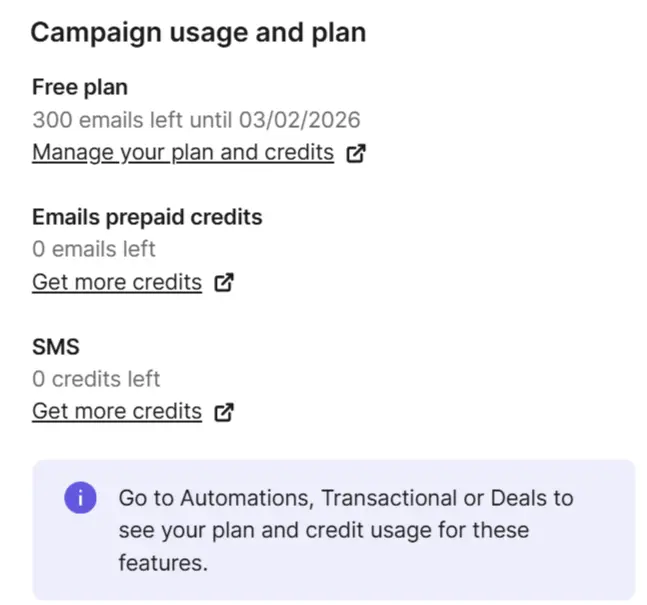
If you need to fix your WordPress emails immediately, Brevo is the #1 choice. It is the best Free SMTP Server for WordPress because it offers 300 free emails/day forever and has a dedicated plugin that sets itself up in minutes.
You check your contact form. “Zero messages.” That’s weird. You test it yourself. Nothing happens.
Welcome to the absolute worst headache in WordPress: The Email Black Hole.
Out of the box, WordPress uses a cheap PHP script called wp_mail(). It is weak. Major email giants—Gmail, Yahoo, Outlook—absolutely hate it. They flag these unverified scripts as junk immediately. It dead-ends them before they even sniff an inbox. Running a store? This is a complete disaster. Customers sit there waiting for receipts that vanish into thin air.
You can fix this with an SMTP (Simple Mail Transfer Protocol) server. It acts like a verified post office that stamps your emails so they get delivered.
I have tested dozens of providers to find the best free SMTP service in 2026. Most “free” plans have been killed off (looking at you, SendGrid), but these 7 still work beautifully.
1. Brevo – The Best Overall (300 Emails/Day)
The Verdict: The modern standard for WordPress sites.
Formerly known as Sendinblue, Brevo is currently the king of free SMTP. While other providers have reduced their free tiers to “trials,” Brevo has kept their 300 emails/day limit permanent.
That is ~9,000 emails a month. Unless you are Amazon, that is more than enough for password resets, contact forms, and order confirms.
Why It’s Our Top Pick for 2026
- Native Plugin Support: Forget about messing with port 587 or 465 manually. You install the “Brevo” plugin, paste one API key, and it auto-configures everything.
- Marketing + Transactional: It is the only free tool that lets you send Marketing Newsletters AND Transactional Emails from the same dashboard. This is huge if you are setting up a welcome email series.
- SMS Support: You can even send SMS notifications (paid add-on) if you want to get advanced.
Now that you have your primary tool sorted, let’s look at the alternatives if you have specific high-volume needs.
2. SendPulse – Best for High Volume (12k/Month)
The Verdict: If 300/day isn’t enough, go here.
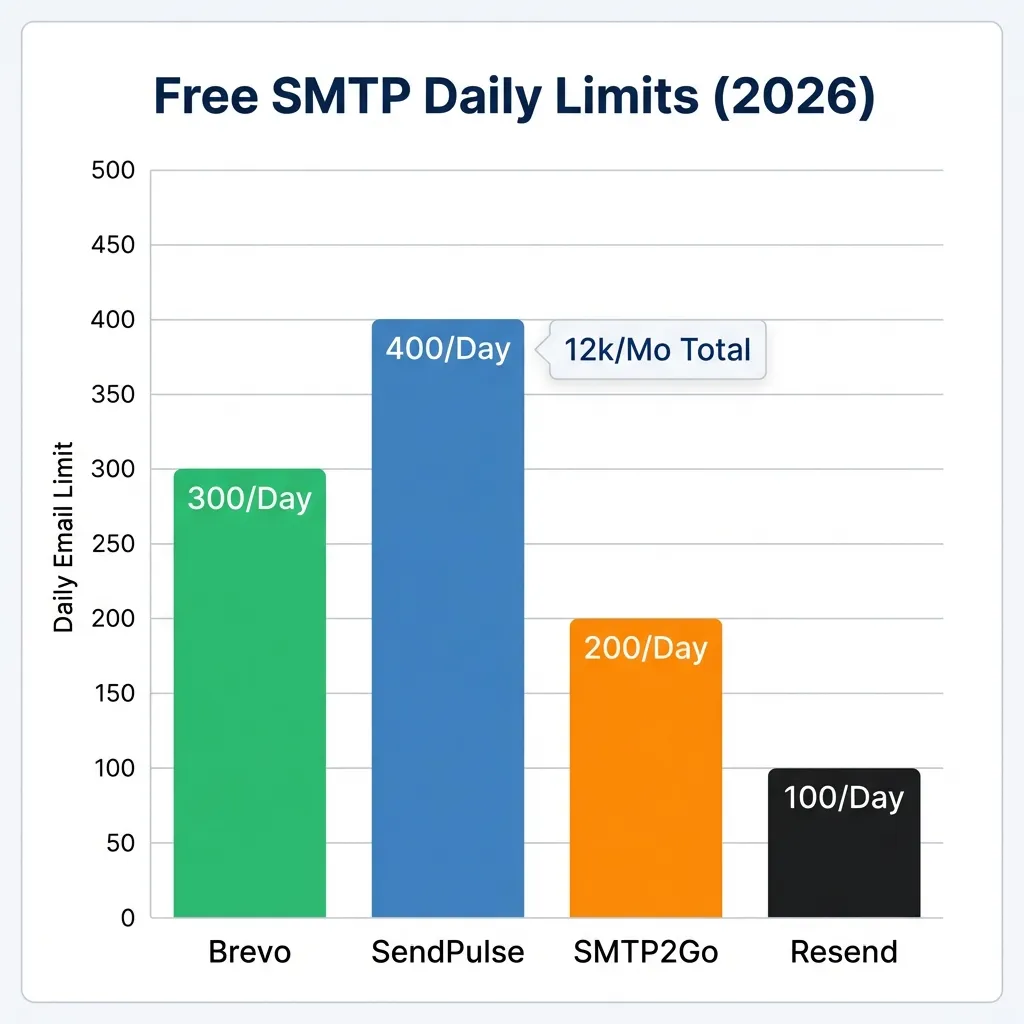
SendPulse is the heavy hitter. They offer 12,000 emails per month on the free plan.
Ideally, if you run a membership site or a busy forum where users trigger thousands of notifications, Brevo’s daily cap might annoy you. SendPulse bumps that daily limit to 400. That’s 12k a month.
The Trade-off
The dashboard is… dense. It tries to do everything (Chatbots, CRM, LMS). It’s got a lot going on. If you just want a simple **SMTP connection**, it can feel bloated. But for raw FREE volume, it is unbeatable.
Other Features
Also, if you are looking to automate abandoned cart emails, their tools are decent but less intuitive than Brevo’s.
We also recommend checking our guide on setting up a welcome series to see how other tools compare.
3. SMTP2Go – A Reliable Free SMTP Server for WordPress
The Verdict: The “Set and Forget” option.
SMTP2Go is fantastic for one specific reason: Reporting.
If an email fails, Brevo gives you a generic error. SMTP2Go actually tells you *why* it failed (e.g., “Mailbox full”) rather than just shrugging.
The Catch: You get 1,000 monthlies, but there is a hard stop at 200 per day. Volume is lower, sure. But the delivery rates are bulletproof.
4. Resend – The Modern Developer’s Choice
The Verdict: Powerful API, but risky for newbies.
Resend is the new gold standard for developers. SendGrid basically bailed on free users in 2025. Resend stepped up with an API that isn’t a pain to use.
The Snag: You actually only get 100 sends a day. It is not for high volume. But if you are building a custom app and value clean documentation over volume, this is your winner. Use it to build a custom tool like the ones we reviewed in our newsletter platforms guide.
5. Gmail (Google Workspace) – The “DIY” Option
The Verdict: Fine for a hobby blog, risky for a real business.
Simply put: Gmail hates this. They demand verified senders. The new requirement involves setting up a Google Cloud Project. Then you must turn on the Gmail API. Finally, you have to mint OAuth keys. It is a miserable, 20-step slog.
The Hard Cap: 500 (Personal) or 2,000 (Workspace).
The Risk: Trip a spam filter? Google might lock your entire inbox. Don’t risk your main business email to save $5.
Comparison Table: Free SMTP Limits (2026)
| Provider | Free Limit | Plugin Support | Best Use Case |
|---|---|---|---|
| Brevo | 300 / Day | Yes (Official) | All-Around Winner |
| SendPulse | 12,000 / Month | Yes (3rd Party) | High Volume (400/day cap) |
| SMTP2Go | 1,000 / Month | Yes (Official) | Reliability (200/day cap) |
| Resend | 100 / Day | Yes (3rd Party) | Developers |
| Gmail | 500 / Day | (Via WP Mail SMTP) | Personal Blogs |
How to Set Up Brevo SMTP (5-Minute Tutorial)
Most people get scared of “SMTP” because it sounds technical. It’s not. Here is the exact process to fix your **email deliverability** issues.
Step 1: Get the API Key
- Create your free property at Brevo.com.
- Click your name (top right) -> SMTP & API.
- Click “Generate new API key”. Copy it (You only see it once!).
Step 2: Connect WordPress
- In WordPress, install the Brevo plugin (Official).
- Go to the plugin settings.
- Paste the API Key.
- Click “Activate”.
Step 3: Fire a Test Email
Hit the “Send Test Email” button. If it says “success,” you are done. Your site is now sending authenticated, deliverable emails.
Pro Tip: Verify Your Delivery Score
Just because Brevo marks it “Sent” doesn’t mean it actually arrived. To sleep easy, run it through a tool like Mail-Tester.com.
- Go to Mail-Tester. Grab the temporary address they give you. Send a test there.
- Use your WordPress site to fire a test email to that specific address.
- Check your score. If you get a 10/10, your SPF and DKIM records are perfect. If you get an 8/10 or lower, follow their guide to fix your DNS records.
FAQ
Why not just use the WP Mail SMTP plugin?
WP Mail SMTP is a connector plugin. It connects your site to a provider (like Brevo or SMTP2Go). You still need an account with a provider to actually send the emails. We recommend using the dedicated plugin for your chosen provider (e.g., the Brevo plugin) as it’s often lighter and easier to debug.
Is a dedicated IP worth it?
For most free plans, you use a “Shared IP”. This means if someone else spams, it could theoretically hurt your deliverability slightly. A dedicated IP (usually ~$25/mo) solves this, but it’s overkill until you are sending 50k+ emails/month. Ideally, focus on building your list first before worrying about dedicated IPs.
Fixing The Most Common SMTP Glitches
Even with premium tools, setup glitches happen. Below are the three frequent error codes you’ll find in your logs, along with their instant fixes.
1. “Connection Timed Out” (The Port 25 Trap)
Why it happens: Hosts like Bluehost and GoDaddy aggressively block Port 25. They do it to stop spam bots. Any attempt to route mail through this port dies instantly.
The Fix: Flip your settings to Port 587 (TLS). Or try Port 465 (SSL). Just do it. Avoid Port 25 entirely for WordPress mail. If you are using the Brevo plugin, this is done for you.
2. “Authentication Failed”
Why it happens: Your API Key is likely dead, invalid, or copied incorrectly.
How to fix: Log into Brevo or SendPulse. Issue a new API key. Replace the old one in your plugin settings. Simple.
3. “Message Rejected” (Authentication Error)
Why it happens: Gmail likely trusts your content but not your identity. Your domain records are missing.
The Fix: Grab the DNS TXT records your SMTP host gives you. Drop them into your DNS records (Namecheap, Cloudflare, etc). It’s like showing a digital passport. Without it, your “Free SMTP Server” is just a spam cannon.
When Should You Pay for SMTP?
I love free tools, but sometimes “Free” costs you money in lost sales. You should upgrade from a free SMTP server to a paid tier if:
- You send more than 300 emails/day: If you hit the Brevo limit, your emails pause until tomorrow. If you run an active store, that downtime is simply not an option.
- You need a Dedicated IP: Think of a Shared IP like a community pool. If one person contaminates it, everyone has to get out. If a random user on your shared IP blasts spam, your legitimate emails could get flagged by association. A dedicated IP isolates your reputation.
- You need logs longer than 3 days: Most free plans only keep email logs for a few days. Paid plans keep them for 30+ days, which is key for debugging customer disputes (“I never got my receipt!”).
Final Verdict
- Choose Brevo if you want the easiest setup and a generous daily limit (300/day). It keeps your marketing and transactional emails under one roof.
- Choose SendPulse if you have a massive spike of emails once a month (12k limit).
Stop losing leads to the spam folder. Fix it today.